
Steps, roles and routing
Each step in a funnel has a role — landing, checkout, upsell, downsell or thanks — and each step decides where the buyer goes next: one destination for yes, one for no. That is the whole routing model.
The five roles
Section titled “The five roles”| Role | What happens there |
|---|---|
| Landing | Your sales page. Cartless puts nothing on it. |
| Checkout | The payment form, with the order bump beside the pay button. |
| Upsell | A second offer after payment, accepted in one click. |
| Downsell | A smaller offer, shown to buyers who declined the upsell. |
| Thanks | The receipt, and any questions you ask after payment. |
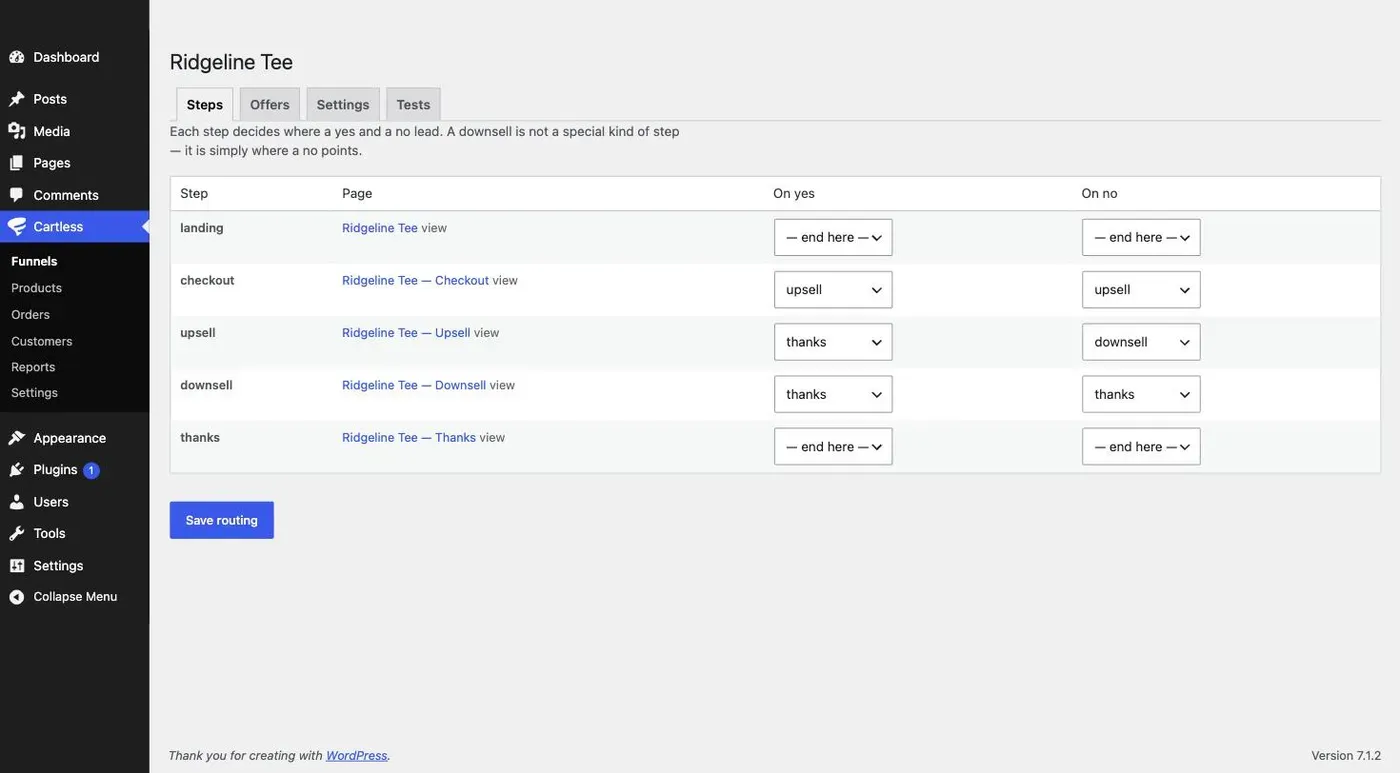
A funnel created from Cartless → Funnels has all five. You can point routes past any of them.
Yes and no
Section titled “Yes and no”On the Steps tab, each step has an On yes and an On no destination. For the checkout, yes is a completed payment. For an upsell or downsell, yes is accepting the offer and no is declining it.
A route can point at any later step, or at — end here —. The thank-you page is where every path ends.
Why a downsell is a route, not a feature
Section titled “Why a downsell is a route, not a feature”A downsell is not a special kind of step — it is simply where a no points. The downsell page uses the same [cartless_upsell] shortcode as the upsell page, and the same one-click acceptance. What makes it a downsell is that the upsell’s On no leads to it.
That also means you can skip it. Point the upsell’s On no at the thank-you page and the downsell page is never shown.
What the free plugin does with upsell steps
Section titled “What the free plugin does with upsell steps”On the free plugin, upsell and downsell steps pass straight through to the thank-you page. Nothing is charged and nothing is lost; the offer simply is not made. The editor says so beside those steps. One-click offers are part of Cartless Pro.
Editing a step’s page
Section titled “Editing a step’s page”Each step’s row on the Steps tab links to its page. Edit it as you would any WordPress page. The only thing a step page needs is its shortcode — or the matching block — somewhere in the content; everything around it is yours.
If a checkout shortcode ends up on a page that is not a checkout step, it shows a notice — This block only works on a checkout step — rather than a broken form.
Save routing
Section titled “Save routing”Changes on the Steps tab take effect when you click Save routing. A live funnel with a half-edited route is worse than a draft, so the editor never saves a route on its own.