
Orders and refunds
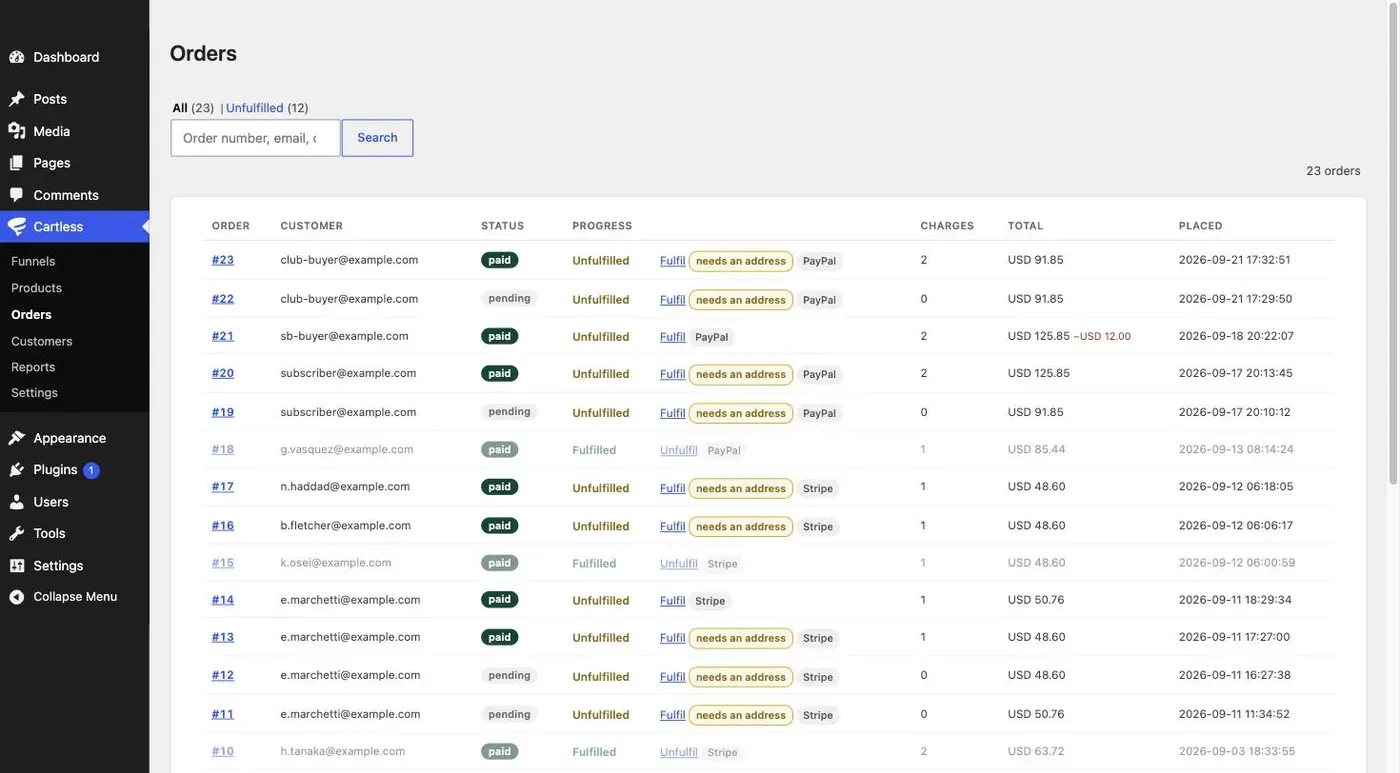
Cartless → Orders lists every paid order with what still needs doing, what the buyer answered after paying, and what they changed. Refunds are per line, so a bump can be refunded without the product. Nothing is ever deleted: an erased customer becomes Anonymous and the financial record stays.
The list
Section titled “The list”Each row shows the order number, when it was placed, the customer, the total (less any refund), and its Progress. Search by order number, email, or what was bought.
What needs doing
Section titled “What needs doing”An order is Unfulfilled until its parcel has left, then Fulfilled. For a product that counts stock, a refund before fulfilment puts the unit back on sale and after fulfilment does not, and each fulfilment is written to the product’s stock history. Click Mark fulfilled when it has shipped or been delivered, Unfulfil if it comes back. The Unfulfilled view of the orders list, oldest first, is the pick list; an order that has nothing to deliver is fulfilled the moment it is paid. There is no “in progress” state: a team that needs a picked-up mark can use the customer’s note, or the order’s own tags when they come.
An order that has just been paid shows a note: Just paid — the customer may still be correcting details. For a short grace period after payment — fifteen minutes by default — the buyer can still change the answers they gave on the thank-you page. Starting work closes that window. If an answer arrives or changes after you started, the order says Changed after you started, so you never find out from the customer.
What the buyer told you
Section titled “What the buyer told you”Questions asked after payment — a grind, a name for the shirt — appear on the order under What the buyer told you, with their first answer and, if they changed it, the change. A question not yet answered says so, and the thank-you page keeps asking until it is.
Per-line refunds
Section titled “Per-line refunds”Open the order and click Refund on a line. The line’s amount, including its share of tax and shipping at the rate recorded when it was sold, goes back to the buyer’s card through Stripe. The order shows less $12.00 refunded. Refunding the bump leaves the product paid; refunding everything refunds everything, still line by line.
Anonymise, not delete
Section titled “Anonymise, not delete”Tax law requires financial records to be kept for years, and the right to erasure does not extend to them. So when a customer asks to be forgotten — through WordPress’s own Tools → Erase Personal Data — their name becomes Anonymous, their address is blanked, and the order with its amounts and dates survives. The list shows (anonymised) beside it.