
Cost and profit
Record what a product costs you and every offer, coupon and shipping rule in Cartless shows its margin as you write it, and Reports shows margin by mechanic — which part of the funnel earns, not just how much came in.
Entering cost
Section titled “Entering cost”On the product, Cost is what one unit costs you. It is optional — but without it, no margin or profit figure anywhere in Cartless can be shown. Enter it on every product a funnel sells and the funnels list gains a Profit column.
Costs are recorded on every order line at the moment of sale. A March order keeps March’s cost, or every historical report becomes fiction.
Margin as you write an offer
Section titled “Margin as you write an offer”In the funnel editor, an offer’s price is stated against its cost on your own numbers: $12.00 at $4.00 cost leaves $8.00. Price an offer below cost and it says so — That is below cost. — and lets you. Facts, never advice.
Margin by mechanic
Section titled “Margin by mechanic”Cartless → Reports shows, for the last 7, 30 or 90 days or a year, one row per mechanic: the main product, the order bump, and the upsell. Each row has units sold, revenue less refunds, cost, margin and margin percentage.
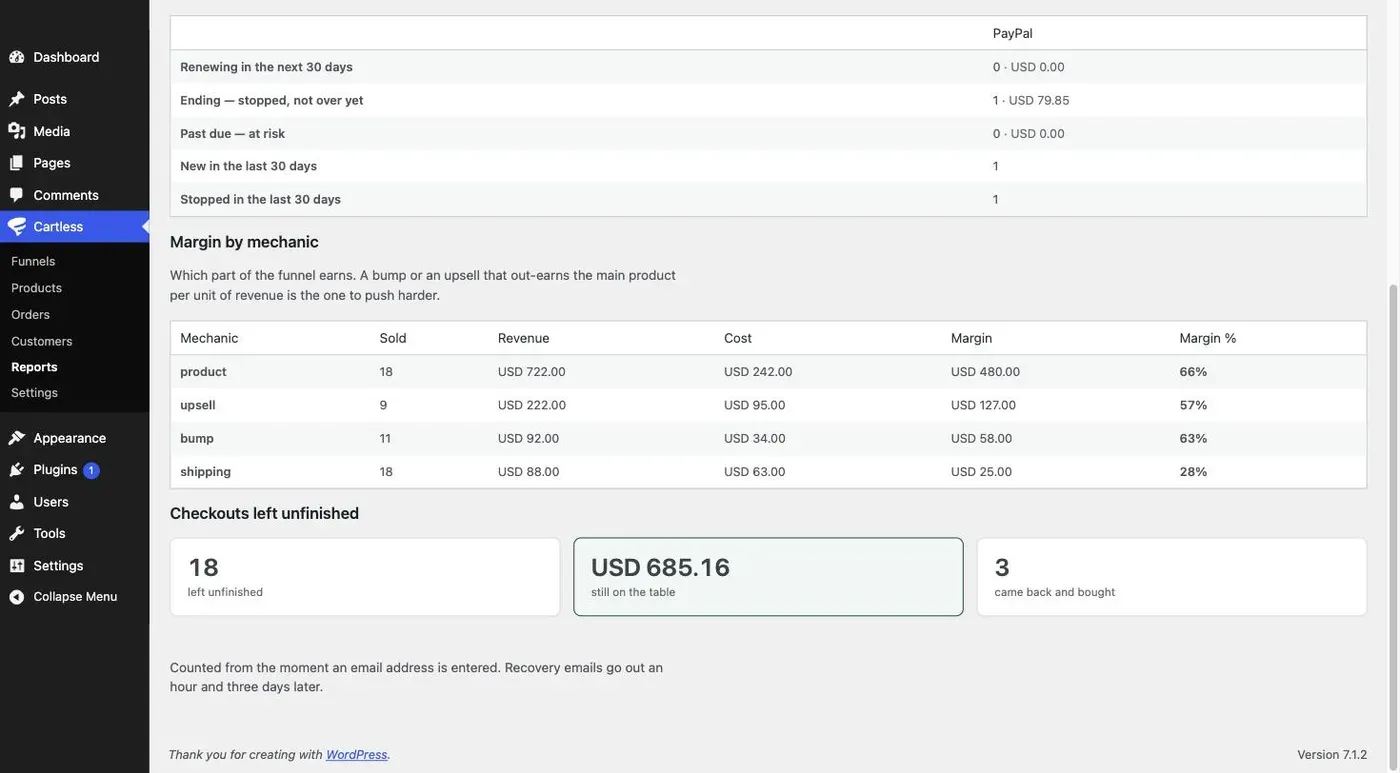
The question it answers: a bump or an upsell that out-earns the main product per unit of revenue is the one to push harder. The bump usually does — it earns on the same page as the product, with no extra traffic — and no generic analytics tool can tell you, because none of them knows what a bump is.
Where some lines have no cost, the report says profit — some lines have no cost rather than showing a number that is wrong.