
Variants and stock
A variant is the same product in a different form: a size, a colour. Cartless tracks stock per combination, because Navy being in stock and XL being in stock does not mean Navy XL is. A product can have three axes at checkout, and a choice appears before payment only if it changes the price or whether you can fulfil the order.
Axes and values
Section titled “Axes and values”On the product, under Variants, add an axis — Size — and its values — S, M, L, XL. Add a second axis — Colour — and its values. Each value can carry a ± price, so XL can cost two dollars more.
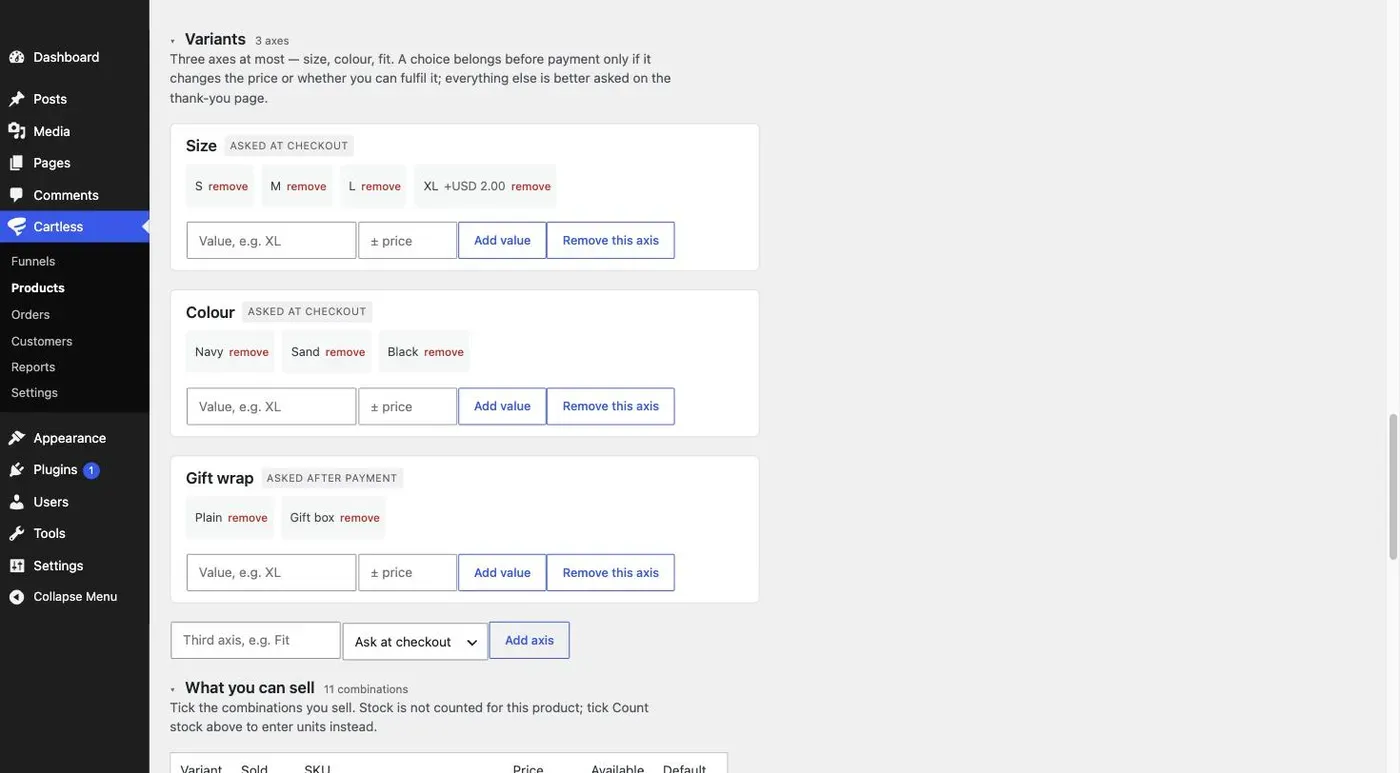
Three axes at checkout is the maximum — size, colour, fit covers apparel, which is most of it. Four means a catalogue, and WooCommerce is the honest answer to that.
Stock per combination
Section titled “Stock per combination”What you can sell is a list of every combination, grouped by the first axis, one row each: a sold tick, a SKU of its own if you want one, the price with any adjustment, and — when the product counts stock — what is available. Untick a combination you do not sell at all; that is different from one that has sold out. A combination you do not sell never appears; a sold-out one appears and cannot be chosen.
With Count stock on, the tick becomes a number. You do not type over it: see Stock and SKUs for how the number moves and how you adjust it.
Stock moves when the money does. Nothing is held while somebody reads the page.
The sold-out combination
Section titled “The sold-out combination”When a combination reaches zero, the checkout shows it as Sold out and will not let the buyer pick it. If two buyers reach the last unit at the same moment, one of them pays and cannot be fulfilled — Cartless flags that order for you to fulfil or refund, rather than letting you find out when the parcel does not go out.
Choices asked after payment
Section titled “Choices asked after payment”Not every choice makes a different thing to stock. A grind for the beans, a name on the shirt — the price is the same and you can always fulfil it. Set that axis to Ask after payment and it is asked on the thank-you page, after the money is taken, where it costs you no conversion. Axes asked after payment do not count toward the limit of three, because they do not multiply what you have to stock.
An axis with stock tracking is always asked at checkout. You cannot sell what you cannot fulfil.
The product can also carry plain Asks — a question that changes nothing about price or stock, such as Name to print on the back. Each can be asked at checkout or after payment. Ask at checkout only when you cannot make the thing without the answer; a buyer who never returns never answers.
What the buyer sees
Section titled “What the buyer sees”At checkout, the axes asked at checkout appear above the pay button. The default value is pre-selected. A sold-out combination is shown and disabled. The price updates when a value carries a price change, and the total recalculates with it.