
Customers
Cartless → Customers lists everyone who has reached a checkout, one row per email address, with what they have spent over time. Nothing is collected for it: it reads the orders, addresses and subscriptions the plugin already keeps, in your own WordPress database. Nothing is sent anywhere.
The list
Section titled “The list”| Column | What it is |
|---|---|
| Customer | Email and name. Click through to their page. |
| Orders | Paid orders, renewals included. |
| Spent | Paid order totals, less refunds. |
| Last order | When they last paid. |
| First seen | When they first reached a checkout. |
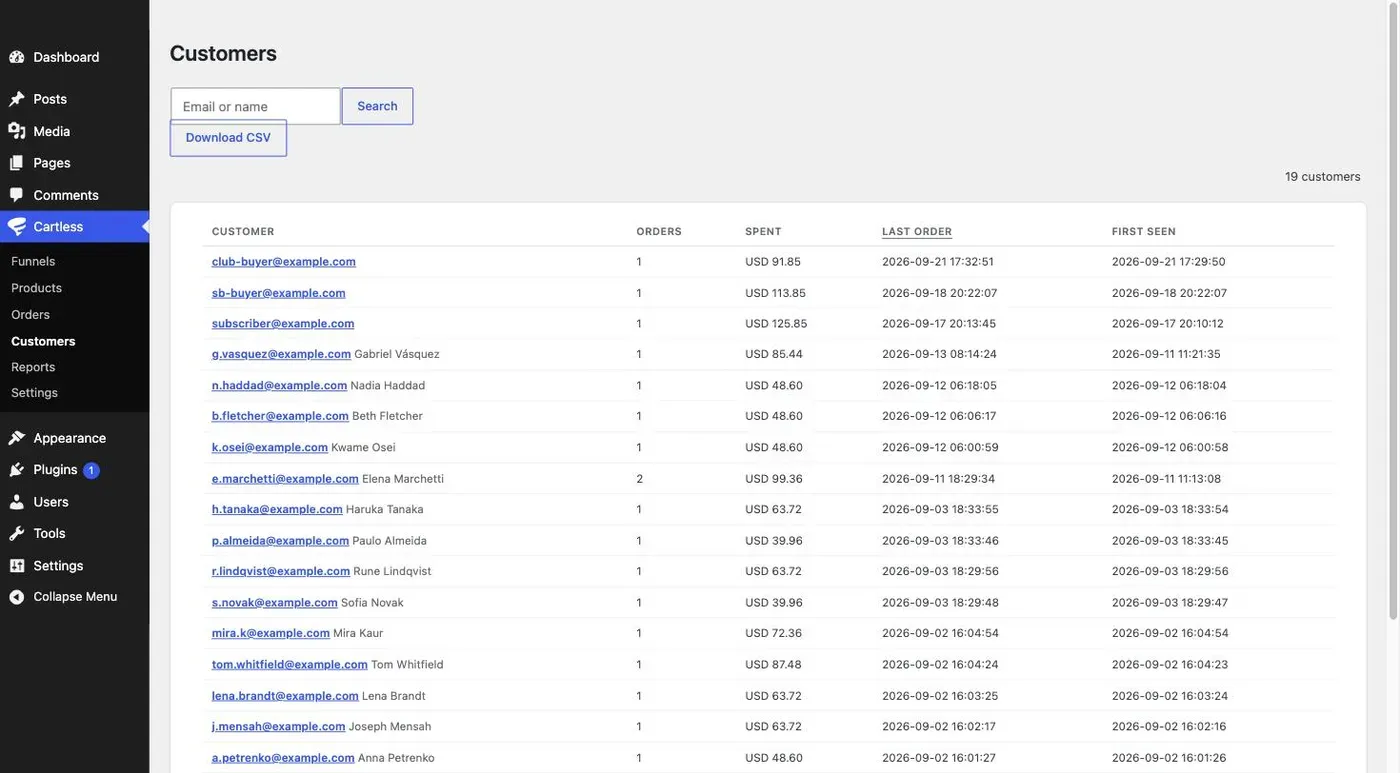
Search by email or name. Click a column heading to sort by it. A customer who reached a checkout but has not paid yet is in the list at zero; they may still pay.
With Pro, a subscription tag marks customers with a live subscription and past due marks those whose renewal failed.
The figures assume one currency. If you sell in two, the sums add them together; make a funnel per currency and read Reports per funnel instead.
The customer page
Section titled “The customer page”Orders, spent, refunded and the average order; every order they placed, in the same rows as the Orders screen, so you can start work or open one from here; the last delivery address they gave; and, with Pro, their subscriptions with the processor billing each one and the date it renews or ends.
Anything you do to an order — refund a line, move it along, cancel a subscription — you still do on the order. The customer page points at orders; it does not duplicate their controls.
The private note
Section titled “The private note”One note per customer, seen only in wp-admin. Use it for what a person told you that you want to remember next time. It is personal data you wrote down, so it is included when the customer asks for their data, and wiped when they ask to be erased.
Export and erase
Section titled “Export and erase”Two buttons on the customer page, Export their data and Erase their data. Each files a request with WordPress’s own privacy tools for that email address and takes you to the Tools screen, where Download personal data or Force erase is one click away. Cartless tells those tools what a customer’s data is, and what stops erasure: a customer with a live subscription cannot be erased until it ends, and the screen says so.
Erasure keeps the money and removes the person: the orders stay, with the name, email, address and note gone. An erased customer stays in the list as (anonymised) with their figures, and has no buttons.
Download CSV
Section titled “Download CSV”Above the list, honouring the current search. One row per customer with an email address: email, name, first seen, last order, orders, spent, refunded, currency, and the country from the last delivery address. Pro adds the number of active subscriptions. Anonymised customers are left out; a mailing tool has no use for them.
The file is made on your own server for your own download. Treat it as the personal data it is.