
How subscriptions work
A subscription in Cartless is a product that renews. You set renews every 1 month on the product, price it per cycle, and put it in a funnel like any other product. The funnel’s processor — Stripe Billing or PayPal Subscriptions, whichever the funnel runs on — takes each renewal on the day it is due and handles failed payments; Cartless turns each renewal into an order, so the month’s parcels show up in Unfulfilled and the month’s revenue shows up in Reports.
Where a subscription can be sold
Section titled “Where a subscription can be sold”| Step | Can renew? |
|---|---|
| Checkout, main product | Yes |
| Upsell or downsell | Yes — one click on Stripe, two on PayPal |
| Order bump | No |
A bump is a tick-box that adds one line to the payment the buyer is already making. A bump that kept charging every month would be a second subscription hiding in a tick-box, so a renewing product cannot be a bump. A one-off bump on a subscription checkout is fine: it goes on the first payment and never renews.
What the buyer pays, and when
Section titled “What the buyer pays, and when”The first payment covers the whole order: the subscription’s first cycle, plus any bump, plus shipping and tax. From then on the processor charges each cycle. Stripe and PayPal take that first payment differently, and the buyer can see the difference.
On Stripe the first payment is one charge. The buyer pays in the card form; Stripe’s first invoice holds the first cycle and every one-off line beside it. Each renewal after that is one charge for the cycle alone.
On PayPal the first payment is two charges, a few minutes apart, because PayPal bills a subscription from a plan, and a plan has only two prices: a one-time setup fee and a cycle price. The buyer approves the subscription once, in PayPal’s window. Then PayPal charges:
- The setup fee — everything on the order that does not renew: the bump, and the shipping too when the subscription product does not ship. Charged once, never again. Without a bump or one-off shipping there is no setup fee and only one charge.
- The first cycle — the subscription product, plus its shipping if it ships. PayPal cannot add shipping to a subscription on its own, so the shipping is part of the cycle price, and that total is what PayPal shows the buyer as renewing.
The buyer sees two payments in their PayPal account and receives two emails from PayPal. Cartless keeps them as one order: the order is paid once both have arrived, and a refund of a line goes back against the charge that took it. If the setup fee is declined, PayPal cancels the subscription.
What renews: the product, and shipping at the rate on the first order if the product ships. If you want renewals to ship free, price the shipping into the product.
Tax on renewals is the rate you configured, inclusive or exclusive as the funnel is set. You do not need Stripe Tax for this.
Coupons apply to the first payment only, and only to the one-off lines on it — a bump, or shipping. A code cannot discount the renewing price itself. If you want “first month half price”, that is a recurring discount, which Cartless does not offer yet.
Managing a subscription
Section titled “Managing a subscription”Every receipt, including every renewal receipt, carries a Manage your subscription link. It opens one page listing every subscription on that email address, Stripe or PayPal alike: what renews, for how much, the date it renews on — or, once stopped, the date it ends on — and a Stop renewing button. There is no account to create and no password: the link in their inbox is the proof it is them.
Stopping ends future charges. The period already paid for runs to its end, and the page keeps showing that date.
On Stripe the page also links to Stripe’s customer portal for changing the card and seeing past invoices. The portal has to be switched on once in your Stripe Dashboard (Settings → Billing → Customer portal) — test mode has a default, live mode does not. Cartless shows a reminder on its admin screens until you dismiss it.
On PayPal the payment method lives in the buyer’s PayPal account, under Automatic payments; the page says so. PayPal also emails the buyer at every charge.
When a payment fails
Section titled “When a payment fails”Stripe retries on its own schedule and emails the buyer a link to update the card. PayPal retries too, then suspends the subscription and emails the buyer. Either way Cartless marks the subscription past due on the order so you can see it, and does nothing else — the retry and the email are the part the processor is good at, and the part that recovers about half of failed renewals.
What you see
Section titled “What you see”- The order that started the subscription shows its status and which processor bills it, what renews and for how much, the next renewal date (or the date it ends, once stopped), a link to it in Stripe or PayPal, its renewals so far, and the cancel buttons: at the end of the period or immediately on Stripe, Stop renewing on PayPal, where a cancel always lets the paid period run out.
- Every renewal is an order with its own lines and charge, tagged renewal, linked to the order that started it. If the product ships, it starts Unfulfilled with the delivery address copied across; if it does not, it is fulfilled at once.
- Refunding a renewal does not cancel the subscription; the same screen has the cancel buttons, so do both when that is what the customer asked for.
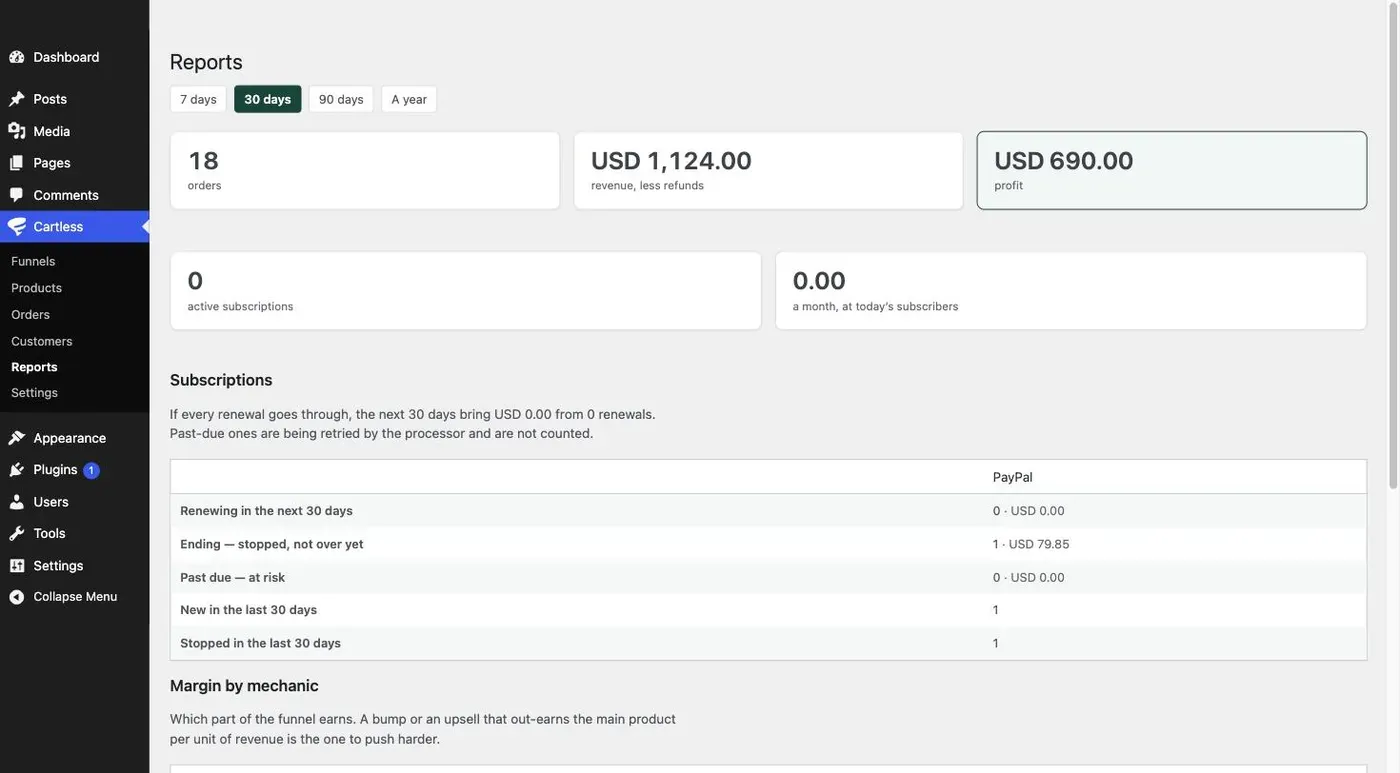
- Reports show active subscriptions, what a month of them is worth, and the month ahead: how many renew in the next 30 days and for how much, how many are ending, how many are past due and the amount at risk, and how many started and stopped in the period — per processor when you use both. The forecast is stated as what the next 30 days bring if every renewal goes through; past-due ones are not counted.
- The product states the fact: 12 subscribers are $276 a month; losing one costs $23.
One subscription per buyer per product
Section titled “One subscription per buyer per product”If a buyer who already has a live subscription to a product accepts an upsell for that same product, Cartless refuses the charge and says so — You are already subscribed to this — before any money moves, and sends them on as if they had declined. The check runs on upsells, where the buyer has just paid and is known for certain. It does not run on the checkout form, because there the only identity is a typed email address, and refusing would tell whoever typed it that the address has a subscription.
Not in this version
Section titled “Not in this version”Trials, quantities, plan changes, pausing, and recurring coupons. A subscription stays with the processor that created it; it cannot be moved to the other without the buyer authorising it again.