
Shipping
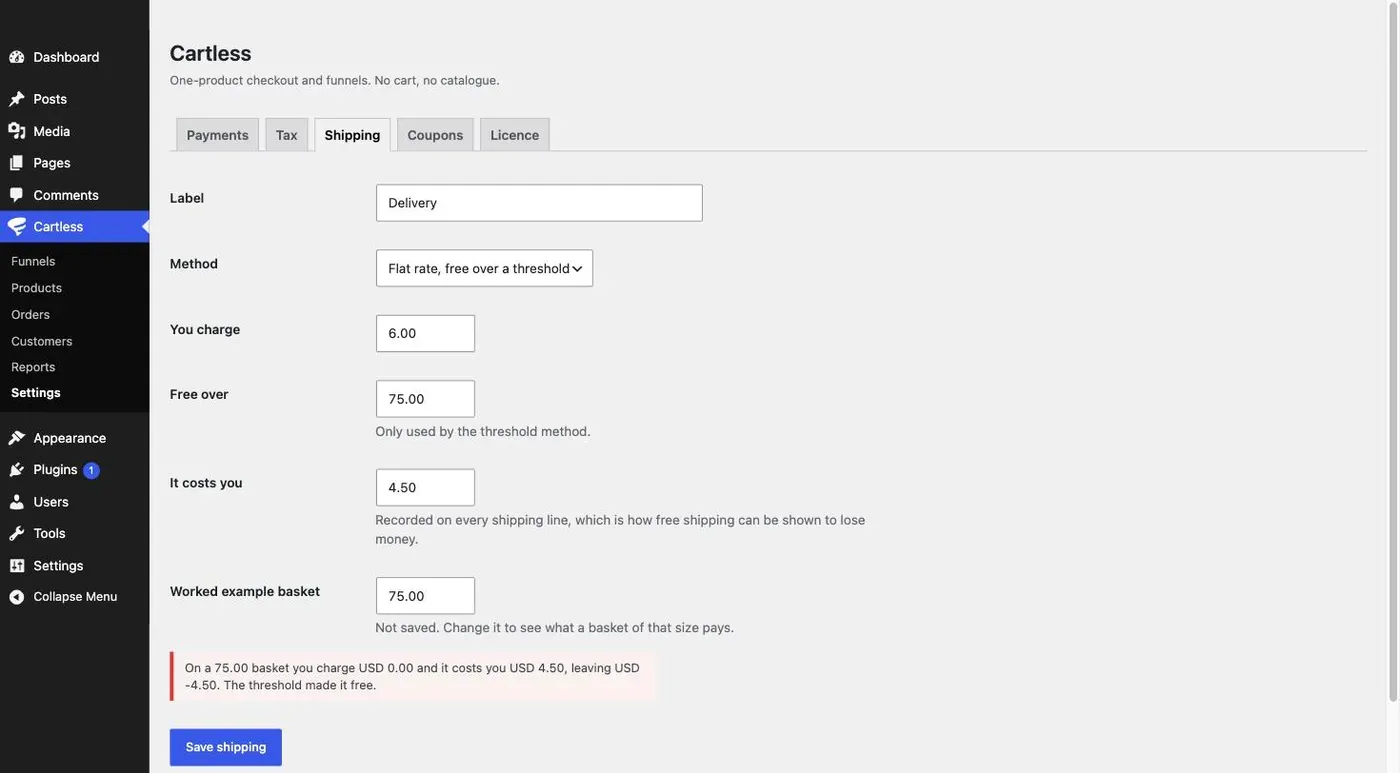
Shipping is one of three methods — free, a flat rate, or a flat rate that becomes free over a threshold — set under Cartless → Settings → Shipping. Only products marked as needing delivery are shipped; a download never carries a shipping line.
Methods
Section titled “Methods”- Free shipping — the buyer pays nothing for delivery.
- Flat rate — one charge per order, whatever is in it.
- Flat rate, free over a threshold — the flat rate until the goods reach the threshold, then free. The threshold is inclusive: an order exactly at it ships free.
The threshold is tested against the goods after any discount.
Which products ship
Section titled “Which products ship”On the product, tick This product needs delivering. An order of only digital goods has no shipping line and no shipping tax. Mixed orders ship.
What shipping costs you
Section titled “What shipping costs you”Beside the charge, Settings asks what shipping actually costs you. It is recorded on every shipping line, which is how free shipping can be shown to lose money: crossing the threshold makes shipping free for the buyer, not costless for you, and Reports shows the difference.
How shipping is taxed
Section titled “How shipping is taxed”That depends on the treatment chosen under Tax — at the highest rate in the basket, split across the goods by value, or not taxed. See Tax.
What is deliberately not here
Section titled “What is deliberately not here”No live carrier rates. Rate-shopping needs an address before the price can be shown, a multi-second API call in the middle of a checkout, and a carrier account to configure before the first sale. A single-product funnel does not need that to take its first payment.